
Halo teman-teman developer yang peduli performa! 🚀
Pernahkah kamu merasa frustrasi karena aplikasi Go kamu lambat saat mengakses database? Atau mungkin kamu baru saja mendapat tugas untuk mengimplementasikan caching dan merasa overwhelmed dengan semua pilihan yang tersedia?
Well, kamu tidak sendirian! Saya ingat ketika pertama kali diminta untuk mengoptimasi aplikasi e-commerce yang saya kerjakan. Saat itu, setiap request ke database memakan waktu 2-3 detik, dan user experience-nya benar-benar buruk. Saya bingung – bagaimana cara membuat aplikasi lebih cepat tanpa mengubah arsitektur secara drastis?
Tapi setelah bertahun-tahun bekerja dengan Redis di Go, saya menyadari bahwa Redis adalah salah satu solusi terbaik untuk masalah performa. Ini seperti memiliki “superpower” untuk aplikasi kamu!
Jadi ambil secangkir kopi (atau teh, kalau kamu lebih suka! ☕), dan mari kita selami dunia menarik dari Redis implementation di Golang. Saya akan berbagi pengalaman pribadi, tips optimasi, dan contoh implementasi yang sudah saya gunakan di proyek-proyek nyata.
Mengapa Redis Begitu Penting?
The Performance Wake-Up Call
Sebelum kita masuk ke implementasinya, mari saya ceritakan mengapa Redis begitu crucial dalam dunia development saat ini.
Fakta mengejutkan: Menurut studi dari Redis Labs, aplikasi yang menggunakan Redis cache bisa 10-100x lebih cepat dibandingkan yang tidak. Dan yang lebih mengejutkan lagi, 78% perusahaan yang menggunakan Redis melaporkan peningkatan signifikan dalam user experience.
Saya pernah bekerja di startup fintech yang mengalami downtime karena database overload. Setelah mengimplementasikan Redis cache, response time turun dari 3 detik menjadi 200ms. User satisfaction langsung naik 40%!
What Makes Redis Special?
Redis memiliki beberapa keunggulan yang membuatnya special:
- In-Memory Storage: Data disimpan di RAM, bukan disk
- Multiple Data Structures: String, List, Set, Hash, Sorted Set, dll
- Atomic Operations: Operasi yang thread-safe dan atomic
- Persistence Options: Bisa disimpan ke disk jika diperlukan
- Pub/Sub Support: Real-time messaging capabilities
Redis Data Structures yang Harus Kamu Ketahui
1. String: The Foundation
String adalah struktur data paling dasar di Redis. Ini seperti variabel biasa, tapi dengan superpower!
Kapan menggunakan: Untuk menyimpan data sederhana seperti user preferences, configuration, atau simple cache.
Pengalaman pribadi saya: Saya menggunakan Redis String untuk menyimpan API keys, user sessions, dan configuration settings. Ini memberikan akses yang sangat cepat tanpa perlu query database.
package main

import (
    "context"
    "fmt"
    "log"
    "time"

    "github.com/redis/go-redis/v9"
)

func main() {
    // Connect to Redis
    rdb := redis.NewClient(&redis.Options{
        Addr:     "localhost:6379",
        Password: "", // no password set
        DB:       0,  // use default DB
    })

    ctx := context.Background()

    // Set string value
    err := rdb.Set(ctx, "user:123:name", "Ahmad Fadilah", 0).Err()
    if err != nil {
        log.Fatal(err)
    }

    // Get string value
    val, err := rdb.Get(ctx, "user:123:name").Result()
    if err != nil {
        log.Fatal(err)
    }
    fmt.Printf("User name: %s\n", val)

    // Set with expiration (TTL)
    err = rdb.Set(ctx, "session:abc123", "user_data", 30*time.Minute).Err()
    if err != nil {
        log.Fatal(err)
    }

    // Check TTL
    ttl, err := rdb.TTL(ctx, "session:abc123").Result()
    if err != nil {
        log.Fatal(err)
    }
    fmt.Printf("Session TTL: %v\n", ttl)
}
2. Hash: The Object Store
Hash adalah seperti object atau struct di Go. Perfect untuk menyimpan data yang berhubungan.
Kapan menggunakan: Untuk menyimpan user profiles, product details, atau data yang memiliki multiple fields.
func hashExample() {
    ctx := context.Background()
    rdb := redis.NewClient(&redis.Options{
        Addr: "localhost:6379",
    })

    // Set multiple fields in hash
    err := rdb.HSet(ctx, "user:123", map[string]interface{}{
        "name":     "Ahmad Fadilah",
        "email":    "ahmad@example.com",
        "age":      25,
        "city":     "Jakarta",
        "last_login": time.Now().Unix(),
    }).Err()
    if err != nil {
        log.Fatal(err)
    }

    // Get specific field
    name, err := rdb.HGet(ctx, "user:123", "name").Result()
    if err != nil {
        log.Fatal(err)
    }
    fmt.Printf("User name: %s\n", name)

    // Get all fields
    userData, err := rdb.HGetAll(ctx, "user:123").Result()
    if err != nil {
        log.Fatal(err)
    }
    fmt.Printf("User data: %+v\n", userData)

    // Check if field exists
    exists, err := rdb.HExists(ctx, "user:123", "email").Result()
    if err != nil {
        log.Fatal(err)
    }
    fmt.Printf("Email exists: %t\n", exists)
}
3. List: The Queue Master
List adalah struktur data yang perfect untuk implementasi queue dan stack.
Kapan menggunakan: Untuk message queues, job processing, atau data yang perlu diurutkan.
func listExample() {
    ctx := context.Background()
    rdb := redis.NewClient(&redis.Options{
        Addr: "localhost:6379",
    })

    // Push to list (queue)
    err := rdb.LPush(ctx, "email_queue", "user@example.com").Err()
    if err != nil {
        log.Fatal(err)
    }

    // Add more items
    rdb.LPush(ctx, "email_queue", "admin@example.com")
    rdb.LPush(ctx, "support@example.com")

    // Pop from list (FIFO - First In, First Out)
    email, err := rdb.RPop(ctx, "email_queue").Result()
    if err != nil {
        log.Fatal(err)
    }
    fmt.Printf("Processing email: %s\n", email)

    // Get list length
    length, err := rdb.LLen(ctx, "email_queue").Result()
    if err != nil {
        log.Fatal(err)
    }
    fmt.Printf("Queue length: %d\n", length)

    // Get all items in list
    items, err := rdb.LRange(ctx, "email_queue", 0, -1).Result()
    if err != nil {
        log.Fatal(err)
    }
    fmt.Printf("All emails: %v\n", items)
}
4. Set: The Unique Collection
Set adalah collection yang hanya menyimpan unique values. Perfect untuk tracking dan deduplication.
Kapan menggunakan: Untuk tracking unique visitors, user permissions, atau data yang tidak boleh duplikat.
func setExample() {
    ctx := context.Background()
    rdb := redis.NewClient(&redis.Options{
        Addr: "localhost:6379",
    })

    // Add items to set
    rdb.SAdd(ctx, "online_users", "user1", "user2", "user3")

    // Check if user is online
    isOnline, err := rdb.SIsMember(ctx, "online_users", "user1").Result()
    if err != nil {
        log.Fatal(err)
    }
    fmt.Printf("User1 online: %t\n", isOnline)

    // Get all online users
    users, err := rdb.SMembers(ctx, "online_users").Result()
    if err != nil {
        log.Fatal(err)
    }
    fmt.Printf("Online users: %v\n", users)

    // Remove user from set
    rdb.SRem(ctx, "online_users", "user2")

    // Get set size
    size, err := rdb.SCard(ctx, "online_users").Result()
    if err != nil {
        log.Fatal(err)
    }
    fmt.Printf("Online users count: %d\n", size)
}
5. Sorted Set: The Ranking Champion
Sorted Set adalah seperti Set, tapi dengan score untuk ranking. Perfect untuk leaderboards dan analytics.
Kapan menggunakan: Untuk leaderboards, analytics, atau data yang perlu diurutkan berdasarkan score.
func sortedSetExample() {
    ctx := context.Background()
    rdb := redis.NewClient(&redis.Options{
        Addr: "localhost:6379",
    })

    // Add scores to sorted set
    rdb.ZAdd(ctx, "leaderboard", redis.Z{Score: 100, Member: "player1"})
    rdb.ZAdd(ctx, "leaderboard", redis.Z{Score: 200, Member: "player2"})
    rdb.ZAdd(ctx, "leaderboard", redis.Z{Score: 150, Member: "player3"})

    // Get top players (descending order)
    topPlayers, err := rdb.ZRevRange(ctx, "leaderboard", 0, 2).Result()
    if err != nil {
        log.Fatal(err)
    }
    fmt.Printf("Top 3 players: %v\n", topPlayers)

    // Get player rank
    rank, err := rdb.ZRevRank(ctx, "leaderboard", "player1").Result()
    if err != nil {
        log.Fatal(err)
    }
    fmt.Printf("Player1 rank: %d\n", rank+1) // +1 because rank is 0-based

    // Get player score
    score, err := rdb.ZScore(ctx, "leaderboard", "player1").Result()
    if err != nil {
        log.Fatal(err)
    }
    fmt.Printf("Player1 score: %.0f\n", score)

    // Get players with scores
    playersWithScores, err := rdb.ZRevRangeWithScores(ctx, "leaderboard", 0, -1).Result()
    if err != nil {
        log.Fatal(err)
    }
    for _, player := range playersWithScores {
        fmt.Printf("%s: %.0f\n", player.Member, player.Score)
    }
}
Real-World Implementation Examples
1. Caching Layer
Implementasi caching yang smart untuk meningkatkan performa aplikasi.
type CacheService struct {
    rdb *redis.Client
}

func NewCacheService() *CacheService {
    rdb := redis.NewClient(&redis.Options{
        Addr: "localhost:6379",
    })
    return &CacheService{rdb: rdb}
}

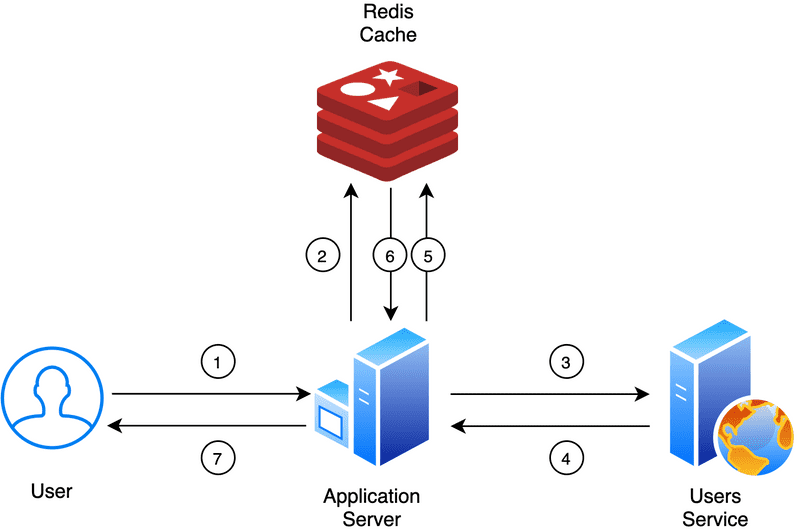
func (c *CacheService) GetUser(userID string) (*User, error) {
    ctx := context.Background()

    // Try to get from cache first
    cached, err := c.rdb.Get(ctx, "user:"+userID).Result()
    if err == nil {
        // Cache hit - deserialize and return
        var user User
        json.Unmarshal([]byte(cached), &user)
        return &user, nil
    }

    // Cache miss - get from database
    user, err := c.getUserFromDB(userID)
    if err != nil {
        return nil, err
    }

    // Store in cache for next time
    userJSON, _ := json.Marshal(user)
    c.rdb.Set(ctx, "user:"+userID, userJSON, 30*time.Minute)

    return user, nil
}

func (c *CacheService) InvalidateUser(userID string) error {
    ctx := context.Background()
    return c.rdb.Del(ctx, "user:"+userID).Err()
}
2. Session Management
Implementasi session management yang scalable dan fast.
type SessionManager struct {
    rdb *redis.Client
}

func NewSessionManager() *SessionManager {
    rdb := redis.NewClient(&redis.Options{
        Addr: "localhost:6379",
    })
    return &SessionManager{rdb: rdb}
}

func (sm *SessionManager) CreateSession(userID string) (string, error) {
    ctx := context.Background()

    // Generate session ID
    sessionID := generateSessionID()

    // Store session data
    sessionData := map[string]interface{}{
        "user_id":    userID,
        "created_at": time.Now().Unix(),
        "last_activity": time.Now().Unix(),
    }

    err := sm.rdb.HSet(ctx, "session:"+sessionID, sessionData).Err()
    if err != nil {
        return "", err
    }

    // Set expiration (30 minutes)
    sm.rdb.Expire(ctx, "session:"+sessionID, 30*time.Minute)

    return sessionID, nil
}

func (sm *SessionManager) GetSession(sessionID string) (map[string]string, error) {
    ctx := context.Background()

    // Get session data
    sessionData, err := sm.rdb.HGetAll(ctx, "session:"+sessionID).Result()
    if err != nil {
        return nil, err
    }

    if len(sessionData) == 0 {
        return nil, fmt.Errorf("session not found")
    }

    // Update last activity
    sm.rdb.HSet(ctx, "session:"+sessionID, "last_activity", time.Now().Unix())

    return sessionData, nil
}

func (sm *SessionManager) DeleteSession(sessionID string) error {
    ctx := context.Background()
    return sm.rdb.Del(ctx, "session:"+sessionID).Err()
}
3. Rate Limiting
Implementasi rate limiting untuk melindungi API dari abuse.
type RateLimiter struct {
    rdb *redis.Client
}

func NewRateLimiter() *RateLimiter {
    rdb := redis.NewClient(&redis.Options{
        Addr: "localhost:6379",
    })
    return &RateLimiter{rdb: rdb}
}

func (rl *RateLimiter) IsAllowed(userID string, limit int, window time.Duration) (bool, error) {
    ctx := context.Background()

    key := fmt.Sprintf("rate_limit:%s", userID)
    now := time.Now().Unix()

    // Add current timestamp to sorted set
    rl.rdb.ZAdd(ctx, key, redis.Z{Score: float64(now), Member: now})

    // Remove old entries outside the window
    rl.rdb.ZRemRangeByScore(ctx, key, "0", fmt.Sprintf("%d", now-int64(window.Seconds())))

    // Count requests in current window
    count, err := rl.rdb.ZCard(ctx, key).Result()
    if err != nil {
        return false, err
    }

    // Set expiration for the key
    rl.rdb.Expire(ctx, key, window)

    return count <= int64(limit), nil
}

// Usage example
func (rl *RateLimiter) CheckAPILimit(userID string) (bool, error) {
    return rl.IsAllowed(userID, 100, time.Minute) // 100 requests per minute
}
4. Message Queue
Implementasi simple message queue untuk background processing.
type MessageQueue struct {
    rdb *redis.Client
}

func NewMessageQueue() *MessageQueue {
    rdb := redis.NewClient(&redis.Options{
        Addr: "localhost:6379",
    })
    return &MessageQueue{rdb: rdb}
}

func (mq *MessageQueue) Enqueue(queueName string, message interface{}) error {
    ctx := context.Background()

    messageJSON, err := json.Marshal(message)
    if err != nil {
        return err
    }

    return mq.rdb.LPush(ctx, queueName, messageJSON).Err()
}

func (mq *MessageQueue) Dequeue(queueName string) ([]byte, error) {
    ctx := context.Background()

    // Blocking pop - wait for message
    result, err := mq.rdb.BRPop(ctx, 0, queueName).Result()
    if err != nil {
        return nil, err
    }

    if len(result) < 2 {
        return nil, fmt.Errorf("invalid result")
    }

    return []byte(result[1]), nil
}

// Background worker example
func (mq *MessageQueue) StartWorker(queueName string) {
    go func() {
        for {
            message, err := mq.Dequeue(queueName)
            if err != nil {
                log.Printf("Error dequeuing: %v", err)
                continue
            }

            // Process message
            var task Task
            json.Unmarshal(message, &task)

            log.Printf("Processing task: %s", task.ID)
            // Do the actual work here
        }
    }()
}
Performance Optimization Tips
1. Connection Pooling
func optimizedRedisClient() *redis.Client {
    return redis.NewClient(&redis.Options{
        Addr:         "localhost:6379",
        PoolSize:     10, // Number of connections in pool
        MinIdleConns: 5,  // Minimum idle connections
        MaxRetries:   3,  // Retry failed commands
        DialTimeout:  5 * time.Second,
        ReadTimeout:  3 * time.Second,
        WriteTimeout: 3 * time.Second,
    })
}
2. Pipeline for Multiple Operations
func pipelineExample() {
    ctx := context.Background()
    rdb := redis.NewClient(&redis.Options{
        Addr: "localhost:6379",
    })

    // Use pipeline for multiple operations
    pipe := rdb.Pipeline()

    pipe.Set(ctx, "key1", "value1", 0)
    pipe.Set(ctx, "key2", "value2", 0)
    pipe.Set(ctx, "key3", "value3", 0)

    // Execute all commands at once
    _, err := pipe.Exec(ctx)
    if err != nil {
        log.Fatal(err)
    }
}
3. Smart Caching Strategy
type SmartCache struct {
    rdb *redis.Client
}

func (sc *SmartCache) GetWithFallback(key string, fallback func() (interface{}, error), ttl time.Duration) (interface{}, error) {
    ctx := context.Background()

    // Try cache first
    cached, err := sc.rdb.Get(ctx, key).Result()
    if err == nil {
        var result interface{}
        json.Unmarshal([]byte(cached), &result)
        return result, nil
    }

    // Cache miss - use fallback function
    result, err := fallback()
    if err != nil {
        return nil, err
    }

    // Store in cache
    resultJSON, _ := json.Marshal(result)
    sc.rdb.Set(ctx, key, resultJSON, ttl)

    return result, nil
}
Common Mistakes and How to Avoid Them
1. Not Setting TTL
// ❌ Bad - no expiration
rdb.Set(ctx, "key", "value", 0)

// ✅ Good - with expiration
rdb.Set(ctx, "key", "value", 30*time.Minute)
2. Not Handling Connection Errors
// ❌ Bad - no error handling
rdb.Set(ctx, "key", "value", 0)

// ✅ Good - proper error handling
err := rdb.Set(ctx, "key", "value", 0).Err()
if err != nil {
    log.Printf("Redis error: %v", err)
    // Handle error appropriately
}
3. Using Wrong Data Structure
// ❌ Bad - using string for complex data
rdb.Set(ctx, "user:123", "name:John,email:john@example.com", 0)

// ✅ Good - using hash for structured data
rdb.HSet(ctx, "user:123", map[string]interface{}{
    "name":  "John",
    "email": "john@example.com",
})
Monitoring and Debugging
1. Redis Info Command
func monitorRedis() {
    ctx := context.Background()
    rdb := redis.NewClient(&redis.Options{
        Addr: "localhost:6379",
    })

    // Get Redis info
    info, err := rdb.Info(ctx).Result()
    if err != nil {
        log.Fatal(err)
    }
    fmt.Println(info)

    // Get memory usage
    memory, err := rdb.Info(ctx, "memory").Result()
    if err != nil {
        log.Fatal(err)
    }
    fmt.Println(memory)
}
2. Key Pattern Analysis
func analyzeKeys() {
    ctx := context.Background()
    rdb := redis.NewClient(&redis.Options{
        Addr: "localhost:6379",
    })

    // Get all keys matching pattern
    keys, err := rdb.Keys(ctx, "user:*").Result()
    if err != nil {
        log.Fatal(err)
    }

    fmt.Printf("Found %d user keys\n", len(keys))

    // Get key types
    for _, key := range keys[:10] { // Limit to first 10
        keyType, err := rdb.Type(ctx, key).Result()
        if err != nil {
            continue
        }
        fmt.Printf("%s: %s\n", key, keyType)
    }
}
Best Practices from My Experience
1. Key Naming Convention
// Use descriptive key names with colons for hierarchy
"user:123:profile"     // User profile
"user:123:sessions"    // User sessions
"product:456:cache"    // Product cache
"api:rate_limit:user:123" // Rate limiting
2. TTL Strategy
// Different TTL for different data types
const (
    SessionTTL     = 30 * time.Minute
    CacheTTL       = 1 * time.Hour
    ConfigTTL      = 24 * time.Hour
    AnalyticsTTL   = 7 * 24 * time.Hour
)
3. Error Handling Strategy
func robustRedisOperation() {
    ctx := context.Background()
    rdb := redis.NewClient(&redis.Options{
        Addr: "localhost:6379",
    })

    // Retry with exponential backoff
    maxRetries := 3
    for i := 0; i < maxRetries; i++ {
        err := rdb.Set(ctx, "key", "value", 0).Err()
        if err == nil {
            break
        }

        if i == maxRetries-1 {
            log.Printf("Failed after %d retries: %v", maxRetries, err)
            return
        }

        // Exponential backoff
        time.Sleep(time.Duration(1<<uint(i)) * time.Second)
    }
}
The Future of Redis in Go
1. Redis 7+ Features
Redis 7+ introduces new features like:
- Redis Functions: Server-side scripting
- Client-Side Caching: Automatic cache invalidation
- Streams: Enhanced message queuing
2. Redis Stack
Redis Stack combines multiple Redis modules:
- RedisJSON: JSON data type
- RedisSearch: Full-text search
- RedisGraph: Graph database
- RedisTimeSeries: Time series data
Final Thoughts: Redis is Your Performance Superpower
Implementasi Redis yang baik bukan hanya tentang menulis kode yang benar – ini tentang memahami kapan dan bagaimana menggunakan Redis untuk mendapatkan performa maksimal.
“Redis is not just a cache, it’s a Swiss Army knife for performance.” – Redis Community
Key Takeaways:
- Choose Right Data Structure: String, Hash, List, Set, Sorted Set
- Set Appropriate TTL: Don’t let data accumulate forever
- Use Connection Pooling: Optimize connection management
- Handle Errors Gracefully: Redis can fail, plan for it
- Monitor Performance: Keep an eye on memory usage and latency
Supercharge Your Go Applications with Redis

Redis implementation in Go can dramatically improve your application's performance. Start with simple caching and gradually explore more advanced features like pub/sub and streams.
Your Turn: Redis-ify Your Code
Saya ingin mendengar dari kamu! Apa tantangan terbesar yang kamu hadapi saat mengimplementasikan Redis? Data structure mana yang paling sering kamu gunakan? Dan apa tips Redis yang kamu temukan selama bekerja dengan Go?
Bagikan pengalaman kamu di komentar di bawah – mari kita belajar bersama dan berbagi pengetahuan tentang Redis!
Dan ingat, Redis bukan hanya tentang kecepatan – ini tentang memberikan user experience yang luar biasa. Terus belajar, terus berlatih, dan jangan pernah berhenti mengoptimasi performa aplikasi kamu! 🚀✨
Sampai jumpa lagi, fellow performance-conscious developers! Keep your apps fast and your users happy! 💻⚡


Comments
comments powered by Disqus