
Kafka in Golang: Complete Implementation and Working Mechanism
Hey fellow developers! 👋
Have you ever heard of Apache Kafka? Or maybe you’re familiar with it but still confused about how to implement it in Golang? Well, in this article, we’ll dive deep into Kafka, from its basic concepts to complete implementation in Go with a relaxed but informative style.
What is Apache Kafka?
Before we dive into implementation, let’s understand what Kafka actually is.
Apache Kafka is a distributed streaming platform developed by LinkedIn in 2011. Think of Kafka as a “highway” for data that allows applications to communicate with each other very quickly and reliably.
Why is Kafka So Popular?
- High Throughput: Can handle millions of messages per second
- Fault Tolerant: Data doesn’t get lost even if servers go down
- Scalable: Easy to scale horizontally
- Real-time: Data can be processed in real-time
Basic Kafka Concepts
Before coding, we need to understand some important terms:
1. Topic
A topic is like a “channel” or “category” for messages. For example:
user-registrationorder-createdpayment-processed
2. Producer
An application that sends messages to Kafka topics.
3. Consumer
An application that reads and processes messages from topics.
4. Broker
A Kafka server that stores and manages topics.
5. Partition
Topics are divided into partitions for parallel processing.
Kafka Implementation in Golang
Alright, now let’s get to the exciting part! Let’s implement Kafka in Go step by step.
Step 1: Project Setup
First, create a new project and install dependencies:
mkdir kafka-golang-demo cd kafka-golang-demo go mod init kafka-demo go get github.com/Shopify/sarama
Step 2: Producer Implementation
Producer Purpose: A producer is an application responsible for sending messages to Kafka topics. In real-world systems, producers are typically used for:
- Event Publishing: Sending events when user actions occur (registration, login, purchase)
- Data Streaming: Sending real-time data from sensors or applications
- Log Aggregation: Collecting logs from various services
- Metrics Collection: Sending metrics and monitoring data
Let’s create a producer that will send messages to Kafka:
package main import ( "fmt" "log" "time" "github.com/Shopify/sarama" ) func main() { // Kafka configuration config := sarama.NewConfig() config.Producer.Return.Successes = true config.Producer.RequiredAcks = sarama.WaitForAll config.Producer.Retry.Max = 5 // Connect to Kafka broker brokers := []string{"localhost:9092"} producer, err := sarama.NewSyncProducer(brokers, config) if err != nil { log.Fatalf("Error creating producer: %v", err) } defer producer.Close() // Send message topic := "user-events" message := &sarama.ProducerMessage{ Topic: topic, Value: sarama.StringEncoder("User John Doe registered at " + time.Now().String()), } partition, offset, err := producer.SendMessage(message) if err != nil { log.Printf("Error sending message: %v", err) return } fmt.Printf("Message sent to partition %d at offset %d\n", partition, offset) }
Step 3: Consumer Implementation
Consumer Purpose: A consumer is an application that reads and processes messages from Kafka topics. Consumers are crucial for:
- Event Processing: Processing events sent by producers
- Data Analytics: Analyzing real-time data for insights
- Service Integration: Connecting various microservices
- Real-time Dashboards: Displaying real-time data on dashboards
- Data Pipeline: Moving data to databases or other systems
Now let’s create a consumer that will read messages:
package main import ( "fmt" "log" "sync" "github.com/Shopify/sarama" ) func main() { // Consumer configuration config := sarama.NewConfig() config.Consumer.Return.Errors = true // Connect to Kafka brokers := []string{"localhost:9092"} consumer, err := sarama.NewConsumer(brokers, config) if err != nil { log.Fatalf("Error creating consumer: %v", err) } defer consumer.Close() // Subscribe to topic topic := "user-events" partitionConsumer, err := consumer.ConsumePartition(topic, 0, sarama.OffsetNewest) if err != nil { log.Fatalf("Error creating partition consumer: %v", err) } defer partitionConsumer.Close() // Loop to read messages for { select { case message := <-partitionConsumer.Messages(): fmt.Printf("Received message: %s\n", string(message.Value)) case error := <-partitionConsumer.Errors(): fmt.Printf("Error: %v\n", error) } } }
Kafka Working Mechanism
Now let’s discuss how Kafka works in detail:
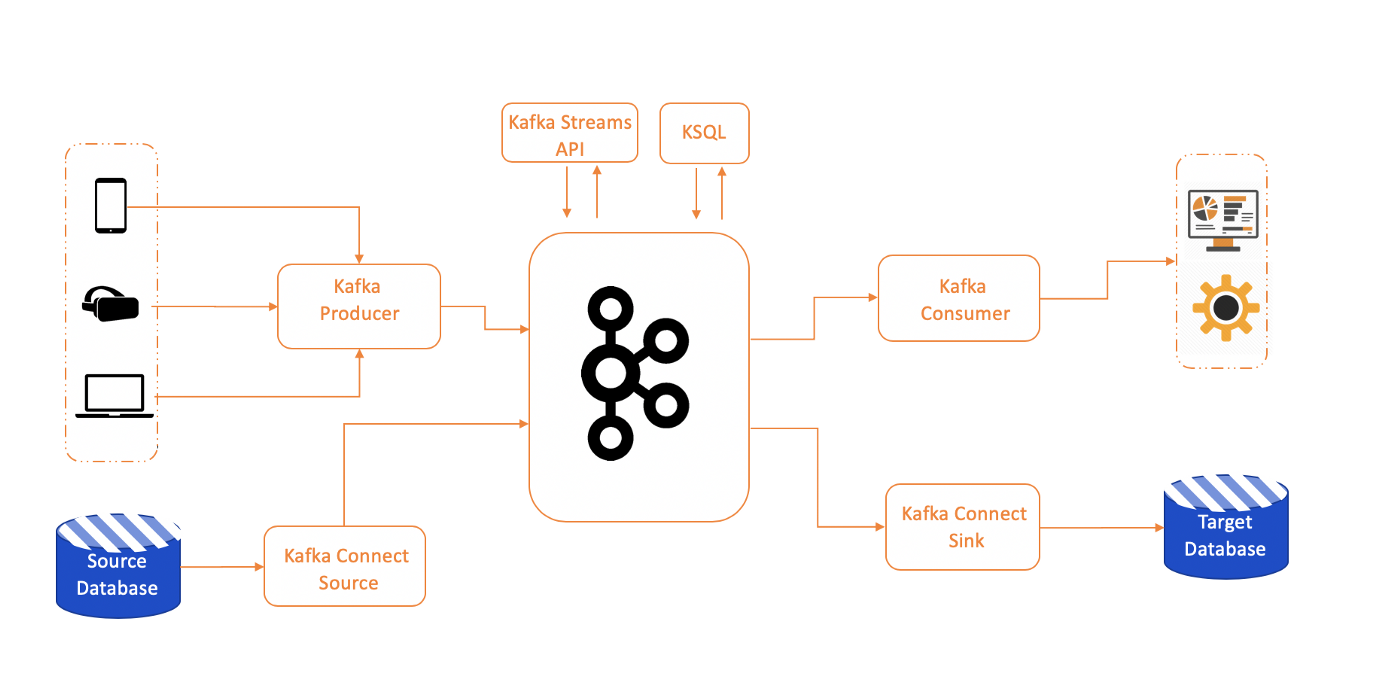
1. Kafka Architecture
┌─────────────┐ ┌─────────────┐ ┌─────────────┐ │ Producer │───▶│ Broker │───▶│ Consumer │ │ │ │ │ │ │ └─────────────┘ └─────────────┘ └─────────────┘ │ ┌─────────────┐ │ Topic │ │ (Partition) │ └─────────────┘
2. Data Flow in Kafka
- Producer sends message to Topic
- Topic is divided into Partitions
- Partitions are stored in Broker
- Consumer reads from Partition
- Offset marks the last read position
3. Partition and Parallelism
// Example partition configuration topic := "user-events" partitions := []int{0, 1, 2} // 3 partitions for _, partition := range partitions { go func(p int) { partitionConsumer, _ := consumer.ConsumePartition(topic, p, sarama.OffsetNewest) for message := range partitionConsumer.Messages() { processMessage(message) } }(partition) }
Implementation Best Practices
1. Error Handling
Error Handling Purpose: Error handling is crucial in distributed systems like Kafka for:
- Reliability: Ensuring messages don’t get lost despite network issues
- Fault Tolerance: Keeping the system running even when components fail
- Data Consistency: Maintaining data consistency across the system
- Monitoring: Detecting issues early and taking action
func sendMessageWithRetry(producer sarama.SyncProducer, message *sarama.ProducerMessage) error { maxRetries := 3 for i := 0; i < maxRetries; i++ { _, _, err := producer.SendMessage(message) if err == nil { return nil } log.Printf("Retry %d: %v", i+1, err) time.Sleep(time.Second * time.Duration(i+1)) } return fmt.Errorf("failed after %d retries", maxRetries) }
2. Connection Pooling
Connection Pooling Purpose: Connection pooling is essential for performance and scalability:
- Performance: Reducing overhead of creating new connections
- Scalability: Handling high loads efficiently
- Resource Management: Managing connection resources properly
- High Availability: Ensuring system remains available even if connections fail
func createProducerPool(brokers []string, poolSize int) ([]sarama.SyncProducer, error) { var producers []sarama.SyncProducer for i := 0; i < poolSize; i++ { config := sarama.NewConfig() config.Producer.Return.Successes = true producer, err := sarama.NewSyncProducer(brokers, config) if err != nil { return nil, err } producers = append(producers, producer) } return producers, nil }
3. Graceful Shutdown
Graceful Shutdown Purpose: Graceful shutdown is crucial for production systems:
- Data Integrity: Ensuring data doesn’t get lost during shutdown
- Resource Cleanup: Properly cleaning up resources
- Service Continuity: Ensuring other services aren’t affected
- Monitoring: Providing clear information about shutdown status
func gracefulShutdown(consumer sarama.Consumer, producer sarama.SyncProducer) { c := make(chan os.Signal, 1) signal.Notify(c, os.Interrupt, syscall.SIGTERM) <-c fmt.Println("Shutting down gracefully...") consumer.Close() producer.Close() os.Exit(0) }
Monitoring and Observability
1. Metrics Collection
Metrics Collection Purpose: Metrics collection is essential for observability and monitoring:
- Performance Monitoring: Monitoring system performance in real-time
- Capacity Planning: Planning capacity based on usage patterns
- Alerting: Detecting issues before they become critical
- Business Intelligence: Analyzing business trends and patterns
import "github.com/prometheus/client_golang/prometheus" var ( messagesSent = prometheus.NewCounter(prometheus.CounterOpts{ Name: "kafka_messages_sent_total", Help: "Total number of messages sent to Kafka", }) messagesReceived = prometheus.NewCounter(prometheus.CounterOpts{ Name: "kafka_messages_received_total", Help: "Total number of messages received from Kafka", }) )
2. Logging
Logging Purpose: Logging is essential for debugging and audit trails:
- Debugging: Making troubleshooting easier
- Audit Trail: Recording all activities for compliance
- Performance Analysis: Analyzing performance based on log patterns
- Security Monitoring: Detecting suspicious activities
import "go.uber.org/zap" logger, _ := zap.NewProduction() defer logger.Sync() logger.Info("Message sent to Kafka", zap.String("topic", topic), zap.Int32("partition", partition), zap.Int64("offset", offset), )
Real-World Use Cases
1. E-commerce Platform
// Order Service func (s *OrderService) CreateOrder(order Order) error { // Save order to database err := s.repo.Save(order) if err != nil { return err } // Send event to Kafka event := OrderCreatedEvent{ OrderID: order.ID, UserID: order.UserID, Amount: order.TotalAmount, Time: time.Now(), } return s.kafkaProducer.Send("order-created", event) } // Payment Service func (s *PaymentService) ProcessPayment(event OrderCreatedEvent) error { // Process payment payment := Payment{ OrderID: event.OrderID, Amount: event.Amount, Status: "pending", } return s.repo.Save(payment) }
2. User Activity Tracking
func (s *UserService) TrackUserActivity(userID string, action string) error { activity := UserActivity{ UserID: userID, Action: action, Timestamp: time.Now(), IP: getClientIP(), } return s.kafkaProducer.Send("user-activities", activity) }
Troubleshooting Common Issues
1. Connection Issues
func checkKafkaConnection(brokers []string) error { config := sarama.NewConfig() config.Net.DialTimeout = 5 * time.Second client, err := sarama.NewClient(brokers, config) if err != nil { return fmt.Errorf("cannot connect to Kafka: %v", err) } defer client.Close() return nil }
2. Message Ordering
// To ensure message ordering, use partition key message := &sarama.ProducerMessage{ Topic: topic, Key: sarama.StringEncoder(userID), // Same userID = same partition Value: sarama.StringEncoder(payload), }
Conclusion
Kafka is a very powerful technology for building scalable and reliable systems. With proper implementation in Golang, we can build systems that are:
- ✅ High Performance: Handle millions of messages per second
- ✅ Reliable: Data doesn’t get lost even with failures
- ✅ Scalable: Easy to scale according to needs
- ✅ Real-time: Process data in real-time
Implementing Kafka in Go with the Sarama library gives us high flexibility and performance. The important thing is to understand the basic concepts and follow proven best practices.
So, ready to implement Kafka in your projects? 🚀
References:
Tags: #golang #kafka #microservices #backend #streaming #message-queue



Comments